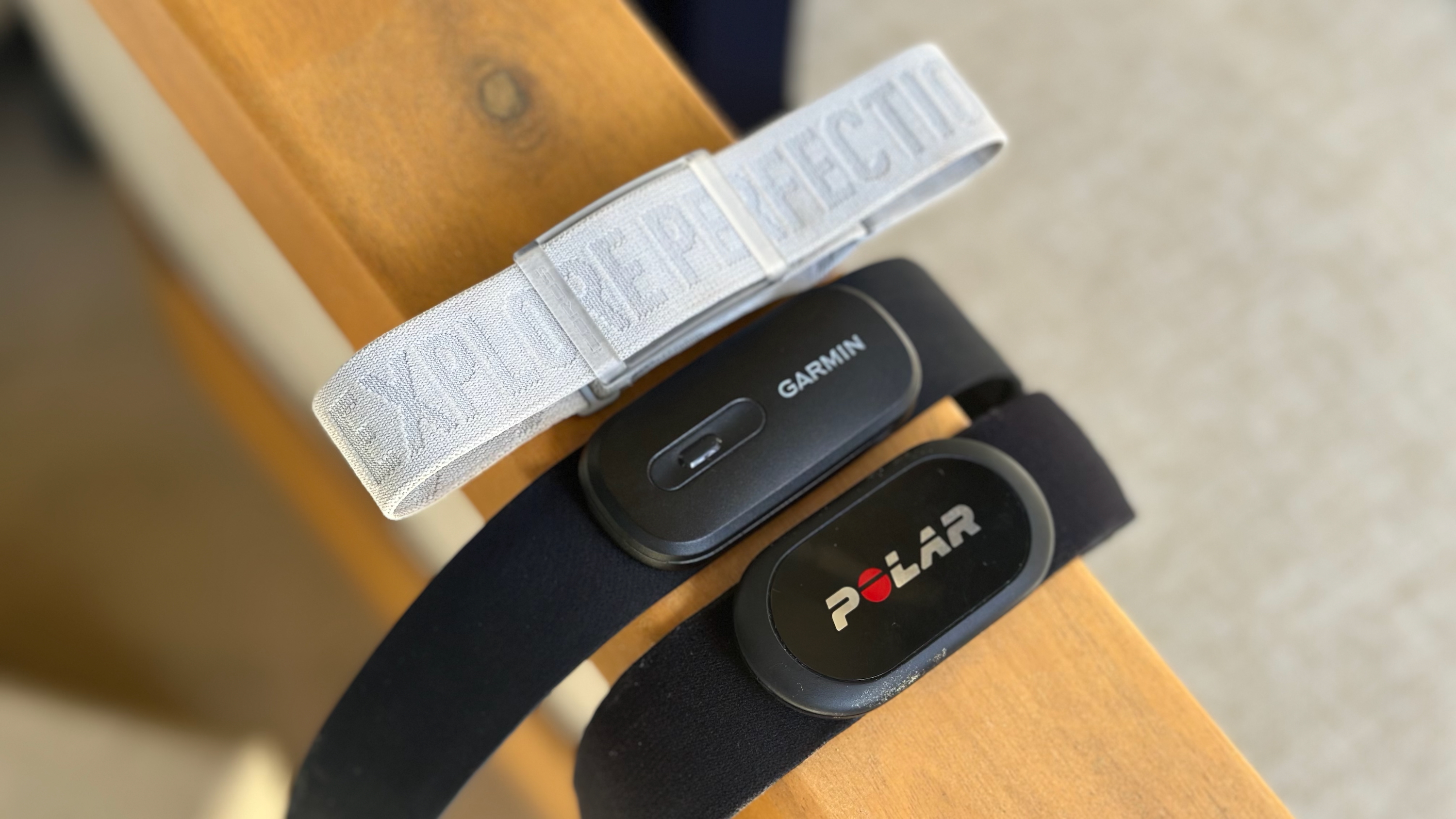
When athletes and fitness enthusiasts talk about the best heart rate monitors, two names often come up: Garmin HRM and Polar H10. Both devices are trusted by runners, cyclists, and triathletes worldwide. But when you dig a little deeper, many users find that the Garmin HRM stands out. Why is Garmin HRM better than Polar H10? The answer is more complex than just “brand loyalty.” It involves a mix of technology, comfort, data accuracy, smart features, and long-term usability.
If you’re wondering which device to invest in, or if your training results depend on reliable heart data, this article breaks down the real differences. We’ll explore not just the specs, but how these two monitors perform in the real world.
Today's Exclusive Deals
Limited-time Exclusive Deals. Check current discount on Amazon.
Check Price on Amazon As an Amazon Associate I earn from qualifying purchases.You’ll also discover a few insights that even experienced users sometimes miss.
Core Technologies: What Sets Garmin Hrm Apart
The heart of any monitor is its sensor technology. Both Garmin and Polar have developed their own proprietary systems. However, Garmin HRM models, especially the HRM-Pro and HRM-Dual, use advanced multi-sensor arrays that measure electrical activity and motion simultaneously.
This means Garmin HRM can deliver:
- More consistent readings during high-motion activities
- Better tracking when you’re running, cycling, or swimming
- Lower data drop-out rates in tough conditions
Polar H10 also uses a highly accurate ECG sensor, but its motion compensation is less advanced. In fast-paced sports or dynamic movements, Polar sometimes struggles with brief drop-outs or delayed readings. Garmin’s newer chest straps solve this problem by integrating accelerometers, giving your watch or app a more complete and uninterrupted data stream.
Non-obvious insight: Many users don’t realize that Garmin’s motion sensors also help filter out “false spikes,” like those caused by electrical interference from gym equipment. This means fewer random peaks in your heart rate data, making post-workout analysis much more reliable.
Comfort And Strap Design
Wearing a heart rate monitor should never distract you from your workout. Both Garmin and Polar offer soft, adjustable straps, but there are key differences.
Garmin HRM straps are known for their:
- Slimmer profile: Less bulk under clothing, which matters for long runs or races
- Flexible, stretchy material: Adapts better to different body types
- Easy snap-on mechanism: Simple to attach and remove, even with sweaty hands
In contrast, the Polar H10 uses a slightly stiffer elastic and a bulkier sensor pod. Some users with smaller chests or sensitive skin report chafing after long sessions. The Polar strap can also slip if not tightened just right, especially during activities like rowing or HIIT workouts.
Here’s a side-by-side comparison of comfort features:
| Feature | Garmin HRM | Polar H10 |
|---|---|---|
| Strap Material | Softer, more elastic | Stiffer, less flexible |
| Sensor Profile | Low-profile | Bulkier pod |
| Fit for Small Frames | Excellent | Good, but can slip |
| Skin Comfort | High | Variable |
Pro tip: For women and those with narrow chests, the lighter Garmin HRM strap often feels “invisible” after a few minutes, reducing the temptation to adjust or remove it mid-workout.
Connectivity And Compatibility
Modern athletes use more than one device. You might pair your heart rate monitor with a smartwatch, bike computer, treadmill, or fitness app. Garmin understands this need for flexibility.
Garmin HRM supports:
- Dual transmission: Both ANT+ and Bluetooth Smart at the same time
- Multiple device connections: Can pair with up to 3 devices via Bluetooth
- Broad app ecosystem: Works seamlessly with Garmin Connect, Zwift, Strava, and more
Polar H10 also supports ANT+ and Bluetooth, but only allows two simultaneous Bluetooth connections. This difference matters during group rides, races, or when you want to share your data with a coach’s tablet and your own phone.
Here’s a quick compatibility overview:
| Feature | Garmin HRM | Polar H10 |
|---|---|---|
| Bluetooth Connections | Up to 3 devices | 2 devices |
| ANT+ Support | Yes | Yes |
| Garmin Device Integration | Native | Third-party only |
| Third-Party Apps | Full compatibility | Good compatibility |
Non-obvious insight: If you use more than one Garmin device (like a bike computer and a watch), only the Garmin HRM can broadcast to both at once without lag or dropouts. This is a big deal for triathletes and multi-sport users.
Data Accuracy And Smart Metrics
Both monitors provide accurate heart rate data. But Garmin goes beyond just “beats per minute. ”
Garmin HRM-Pro and HRM-Run models include:
- Running dynamics: Measures ground contact time, cadence, vertical oscillation, and more
- Advanced calorie tracking: Combines heart rate with motion for more precise numbers
- Offline storage: Logs data when you’re away from your phone or watch
Polar H10’s main advanced feature is heart rate variability (HRV), which is good for stress and recovery tracking. However, it lacks running dynamics and offline data storage unless paired with the Polar Beat app.
Let’s break down the smart metric differences:
| Metric/Feature | Garmin HRM-Pro/Run | Polar H10 |
|---|---|---|
| Heart Rate Accuracy | Excellent | Excellent |
| Running Dynamics | Yes | No |
| Calorie Accuracy | High (motion + HR) | Heart rate only |
| Offline Data Storage | Yes | Only with app |
| HRV Support | Basic | Advanced |
Pro tip: If you run without your phone or watch (for example, in team sports or swimming), the Garmin HRM will store your workout and upload it later. Polar H10 can only do this if you start the session from the app.
Battery Life And Maintenance
Reliability is vital, especially for long races or outdoor adventures. Both Garmin and Polar use CR2032 coin cell batteries, but users often report longer life from Garmin HRM units.
- Garmin HRM-Pro: Up to 12 months (1 hour/day use)
- Polar H10: Up to 400 hours
Battery life depends on usage patterns, temperature, and how often you connect/disconnect the device. In real-world tests, Garmin HRM models tend to lose less power in standby mode, which means fewer surprise “dead battery” moments.
Another factor is maintenance. Garmin’s battery compartment is easier to access, with a simple twist-off cap. Polar’s requires a tiny screwdriver, which can be frustrating if you’re in a hurry.
Non-obvious insight: Many athletes forget that sweat and salt can corrode battery contacts over time. Garmin’s sealed design offers slightly better protection, which means fewer connection errors after months of heavy use.
Durability And Water Resistance
Heart rate monitors see a lot of action. Sweat, rain, mud, and even pool water are common challenges. Both Garmin HRM and Polar H10 are rated water-resistant, but there are small differences that matter for swimmers and those who train outdoors year-round.
- Garmin HRM-Pro: 5 ATM (up to 50 meters)
- Polar H10: 30 meters
However, only the Garmin HRM-Pro and HRM-Swim are specifically designed to store heart rate data underwater and sync it later. Polar H10 can transmit live data, but many watches (even Polar’s own) can’t receive Bluetooth signals underwater.
Pro tip: If you train for triathlons or open-water swimming, Garmin HRM’s memory sync feature is a game-changer. You don’t lose your workout data just because your watch loses the signal.
Integration With Training Platforms
Serious athletes use platforms like Garmin Connect, Strava, Zwift, and TrainingPeaks to analyze their performance. Garmin HRM integrates more deeply into the Garmin ecosystem, providing automatic uploads, advanced running metrics, and seamless device pairing.
Polar H10 works well with Polar Flow and most third-party apps, but integration is sometimes less smooth. For example, Garmin watches can only display basic heart rate from Polar H10—no running dynamics or advanced metrics.
Non-obvious insight: Garmin’s own platform supports group challenges, custom workouts, and coach feedback directly from HRM data. If you train with a team or want to share progress with a coach, Garmin’s system saves time and reduces syncing errors.
Real-world User Experiences
Reading specs is one thing; using the devices is another. User reviews and independent tests often favor Garmin HRM for reliability and ease of use.
- Fewer dropouts: Garmin HRM users report more consistent connections, even in races with lots of wireless interference.
- Quick setup: Most can pair a Garmin HRM to a watch or app in under a minute.
- Less fiddling: The strap rarely needs adjustment mid-workout.
Polar H10 gets praise for HRV tracking and ECG-grade accuracy, but some users mention:
- Occasional strap slipping, especially during high-intensity intervals
- More complicated firmware updates (requires the Polar Beat app)
- Limited advanced metrics unless you use the Polar Flow ecosystem
Here’s what one triathlete shared: “I used Polar for years but switched to Garmin HRM-Pro. The difference was clear during group rides—no more random disconnects, and my running cadence data uploads automatically.”
Price And Value For Money
Price is always a factor. As of 2026, both the Garmin HRM-Pro and Polar H10 retail around $90–$130, depending on sales and region. At first glance, they seem similar. But Garmin’s extra features (running dynamics, offline storage, better multi-device support) often justify a slightly higher price.
If all you want is accurate heart rate for gym workouts, Polar H10 is a solid choice. But for athletes who want more data, easier use, and better long-term durability, Garmin HRM delivers more value per dollar.
Common Mistakes When Choosing A Heart Rate Monitor
Many buyers focus only on initial cost or which device their friend uses. Here are common mistakes to avoid:
- Ignoring compatibility: Not all monitors work with every app or device. Check before you buy.
- Overlooking comfort: A monitor you hate wearing will end up in a drawer.
- Not considering extra metrics: If you want to improve running form or train for triathlons, advanced data matters.
- Forgetting about battery and maintenance: A dead battery on race day can ruin months of training.
- Assuming all water resistance is equal: If you swim, memory sync is critical.
Who Should Choose Garmin Hrm?
Garmin HRM isn’t just for Garmin watch owners. It’s the best fit if you:
- Do multi-sport or triathlon training
- Run or bike in groups where wireless interference is common
- Want advanced running metrics (like vertical oscillation, ground contact time)
- Need offline data storage for swimming or phone-free workouts
- Use more than two devices at the same time
- Value a comfortable, low-profile strap for long workouts
Who Might Prefer Polar H10?
Polar H10 still has strengths for certain users:
- Those who want advanced HRV tracking for stress and recovery
- Athletes who already use Polar watches and the Flow ecosystem
- People who do mainly indoor workouts (where strap slip is less of an issue)
- Budget-focused users who don’t need running dynamics or offline storage
Final Thoughts
Choosing between Garmin HRM and Polar H10 comes down to your training style, comfort needs, and the level of data you want. For most serious athletes, Garmin HRM offers smarter features, better comfort, and more reliable connections. Its deeper integration with devices and training platforms gives you a more complete picture of your performance.
That said, both monitors are high-quality tools. If you focus on steady-state cardio or are happy with basic heart rate tracking, Polar H10 is still a good option. But if you want to unlock everything modern training technology can offer—and avoid common frustrations—Garmin HRM stands out as the smarter investment.
For more details on heart rate training, you can visit the official Garmin Heart Rate Monitor Guide.
Frequently Asked Questions
Is The Garmin Hrm Compatible With Non-garmin Devices?
Yes. Garmin HRM models support both ANT+ and Bluetooth Smart, so they work with most smartphones, bike computers, and fitness apps—not just Garmin watches. This makes them a flexible choice for athletes who use multiple brands.
Can I Use The Garmin Hrm For Swimming?
Absolutely. The Garmin HRM-Pro and HRM-Swim are designed to store heart rate data during swims and upload it to your watch after you exit the water. This feature is not available on Polar H10 unless you start the session with an app, and even then, Bluetooth signals often fail underwater.
Does The Polar H10 Offer Any Features That Garmin Hrm Lacks?
Polar H10 is known for its advanced heart rate variability (HRV) support, which is useful for tracking stress and recovery. If HRV is your main focus, Polar H10 may be a better fit. However, it lacks running dynamics and multi-device Bluetooth support.
How Long Does The Battery Last On Garmin Hrm Compared To Polar H10?
Both use a CR2032 battery. Garmin HRM typically lasts up to 12 months (based on 1 hour of use per day), while Polar H10 is rated for around 400 hours. In practice, Garmin’s power management tends to give a longer standby life, but actual results depend on your usage.
Which Monitor Is Better For Group Workouts Or Races?
Garmin HRM handles crowded environments better, thanks to its robust multi-sensor tech and support for more simultaneous connections. If you train with a group or race in events with lots of wireless devices, Garmin HRM offers fewer dropouts and more consistent data.
Choosing the right heart rate monitor can make training more effective and enjoyable. If you want the most reliable, feature-packed option, Garmin HRM is the clear winner for most athletes.