

Are you wondering if a walking pad can fit under your desk? If you’ve been thinking about staying active while working but aren’t sure if your workspace can handle it, you’re not alone.
Finding the right fit is key to turning your desk into a mini treadmill station without sacrificing comfort or space. Keep reading, because you’re about to discover everything you need to know to make walking at your desk a reality.
Choosing The Right Walking Pad
Choosing the right walking pad is key for a good experience. It must fit your desk space and meet your daily needs. Many factors matter before buying one. Size, weight limit, noise, and speed control all affect comfort and use.
Size And Dimensions
Measure your desk area first. The walking pad should fit easily under your desk. Check the walking pad’s length and width. A slim model saves space. Also, consider height clearance under the desk. The pad must not touch the desk bottom while in use.
Weight Capacity
Each walking pad supports a different weight. Choose one that holds your body weight safely. A higher weight limit means better durability. Avoid pads with low weight limits if you are heavy. This keeps the device stable and safe.
Noise Levels
Quiet operation matters in work settings. Look for walking pads with low noise motors. This helps you focus on work or calls. Some models show decibel levels. Choose one below 50 decibels for quiet use.
Speed Settings
Speed control helps match walking pace. Some pads offer multiple speed settings. Choose one with easy speed adjustment. Slow speeds suit work tasks. Faster speeds can be used during breaks. Adjustable speed keeps your walk comfortable and safe.
Measuring Your Desk Space
Measuring your desk space is the first step to fitting a walking pad under your desk. Accurate measurements help ensure comfort and safety. It also prevents buying a walking pad that won’t fit properly. Focus on the height, width, and depth of the space below your desk. Check for obstacles that might block the walking pad.
Desk Height And Clearance
Measure from the floor to the bottom of your desk. Make sure there is enough clearance for the walking pad and your legs. Most walking pads need at least 7 to 9 inches of height space. Allow extra room for comfortable movement. Remember to consider any drawers or cables hanging underneath.
Under-desk Width And Depth
Measure the available width and depth under your desk. The walking pad’s width must fit comfortably without hitting desk legs. Check the depth from the front edge to the back wall or furniture. Choose a walking pad smaller than these measurements. This prevents it from sticking out or feeling cramped.
Cable Management Considerations
Plan where the walking pad’s power cable will run. Avoid cables that block your walking path or create tripping hazards. Use cable clips or ties to keep cords neat and out of the way. Make sure power outlets are close enough for easy connection. Proper cable management keeps your workspace safe and tidy.
Types Of Desks Compatible With Walking Pads
Walking pads are a great way to stay active while working. Choosing the right desk is important for fitting a walking pad underneath. Not all desks have enough space or the right design. Some desks work better with walking pads than others. Understanding which desks fit walking pads helps create a comfortable workspace.
Standing Desks
Standing desks offer plenty of space underneath. They are taller than regular desks. This height makes it easier to place a walking pad below. Many standing desks have open areas without drawers. This open space fits walking pads well. Users can walk and work comfortably at standing desks.
Standard Office Desks
Standard office desks vary in size and shape. Some have drawers or cabinets that limit space. Small walking pads might fit under desks without bottom shelves. Measuring desk height and width helps check compatibility. Desks with clear legroom work best for walking pads.
Adjustable Desks
Adjustable desks can change height to fit walking pads. Users can raise the desk to stand and walk. These desks provide flexibility for sitting and walking times. They often have enough space underneath for a walking pad. Adjustable desks support movement and comfort during work.
Installation Tips For Walking Pads
Installing a walking pad under your desk takes some planning. Proper setup ensures comfort and safety. It also keeps the workspace practical and easy to use. Follow these tips to install your walking pad correctly.
Positioning For Comfort And Safety
Place the walking pad so your feet can move freely. Keep enough space for your legs to avoid bumps. Adjust the desk height to prevent strain on your back. Make sure you stand straight while walking. Use a flat, stable surface to avoid slipping.
Securing The Walking Pad
Lock the walking pad wheels or feet if possible. This prevents unwanted movement while walking. Check if the pad fits well under the desk frame. Use non-slip mats under the pad for extra stability. Keep cords away from foot paths to avoid trips.
Maintaining Accessibility
Leave space to easily get on and off the pad. Avoid blocking drawers or chair wheels with the walking pad. Make sure controls are easy to reach while working. Keep your workspace clear to avoid distractions. Regularly check the pad for smooth operation.
Maximizing Space Efficiency
Maximizing space efficiency is key when adding a walking pad under a desk. Small work areas need smart solutions. A walking pad should fit without crowding your workspace. Choosing the right model and setup helps keep your area tidy and functional.
Space-saving options let you enjoy walking while working. Your desk and walking pad can work well together. Use the right tools to keep everything organized and accessible.
Foldable And Compact Models
Foldable walking pads save lots of space. They fold flat and slide easily under the desk. Compact models are lightweight and slim. They fit well in tight spaces. These models make it simple to switch between sitting and walking. A small footprint keeps your room neat.
Storage Solutions
Storage helps keep your desk area clean. Use shelves or wall hooks to hold walking pad accessories. A storage box can store remote controls or chargers. Keep cables organized with clips or ties. Proper storage extends the life of your equipment. It also keeps your workspace safe and clutter-free.
Multi-functional Desk Setups
Multi-functional desks combine walking and working smoothly. Adjustable desks let you change height for comfort. Some desks have built-in space for a walking pad. This design maximizes room use and convenience. It creates a healthy work routine without extra furniture. Multi-use setups save time and improve focus.
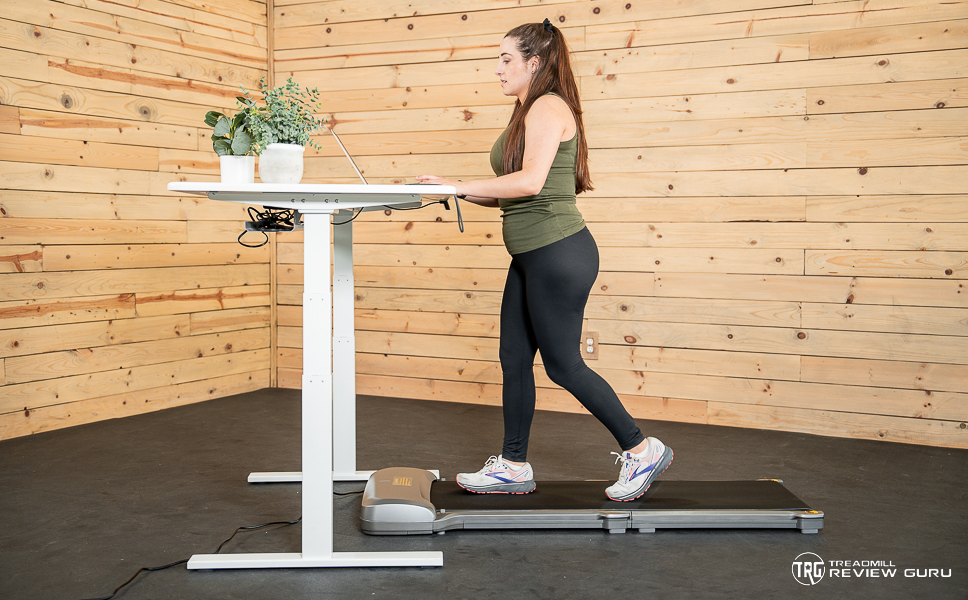
Benefits Of Using Walking Pads Under Desks
Walking pads fit neatly under desks. They help people stay active during work. Using them has many advantages. These benefits improve health, focus, and daily habits.
Small steps can make a big difference. Let’s explore how walking pads help in different ways.
Health And Wellness
Walking pads encourage gentle movement throughout the day. This lowers the risk of heart disease and obesity. They also help reduce back and neck pain. Moving often keeps muscles strong and joints flexible. Users feel more energetic and less tired.
Boosting Productivity
Walking while working helps keep the mind alert. It improves concentration and creativity. People find it easier to solve problems and stay focused. Short walks under the desk break up long sitting hours. This leads to better work output and fewer mistakes.
Reducing Sedentary Time
Sitting too long is harmful to health. Walking pads reduce the time spent sitting still. They encourage more daily movement, which helps burn calories. Less sitting lowers the risk of diabetes and other diseases. Users develop healthier habits without interrupting work.
Common Challenges And Solutions
Using a walking pad under a desk has many benefits. It helps keep you active while working. Yet, some common challenges may come up. These issues can affect your comfort and work focus. Knowing these problems and their solutions makes the experience better.
Noise And Distraction
Walking pads may create noise during use. This can distract you or others nearby. Choose a walking pad with a quiet motor. Place a mat underneath to reduce sound. Earphones can help block out noise. Keep the volume low to stay aware of your surroundings.
Limited Space Issues
Under-desk space is often small. The walking pad must fit without crowding your legs. Measure your desk height and width first. Select a slim and compact walking pad. Store it upright when not in use. Clear the area around your desk for easier movement.
Ergonomic Adjustments
Walking while working needs good posture. Adjust your desk height to avoid bending. Use a standing desk or riser if possible. Keep your screen at eye level. Stand tall and keep your shoulders relaxed. Take breaks to rest your legs and feet.
:max_bytes(150000):strip_icc()/vwt-walking-pads-underdesk-treadmills-apr-24-test-egofit-walker-pro-m1-jthompson-8532-b1e6f74817d54c10988bb6eabf7a4da1.jpeg)
Popular Walking Pad Models For Under-desk Use
Walking pads designed for under-desk use help combine work and light exercise. These devices fit in tight spaces and allow walking while sitting or standing. Choosing the right model depends on size, price, and features. Below are popular walking pads suited for under-desk setups.
Top Compact Picks
Compact walking pads fit easily under most desks. The Xiaomi WalkingPad A1 Pro is slim and light. It folds flat for easy storage. Another option is the Goplus 2 in 1 treadmill. It is small and quiet. Both models offer basic speed control and smooth operation. They suit home offices with limited room.
Budget-friendly Options
Affordable walking pads provide good value without many extras. The Sunny Health & Fitness SF-T7945 costs less but works well. It has a simple control panel and steady speed. The UREVO Walking Pad is another wallet-friendly choice. It supports walking speeds up to 4 mph. These models suit beginners and casual users.
Premium Features
Premium walking pads include advanced controls and comfort features. The WalkingPad R1 Pro has a digital display and app connectivity. Users can track distance, speed, and calories. The LifeSpan TR1200-DT3 offers shock absorption and a quiet motor. These models cost more but enhance the walking experience under a desk.

Frequently Asked Questions
Can A Walking Pad Fit Under Most Desks?
Yes, many walking pads are designed to fit under standard desks. They are compact and slim, allowing easy placement without disrupting workspace.
What Desk Height Is Ideal For A Walking Pad?
A desk height of 28 to 30 inches is ideal. This allows comfortable walking and working without straining your posture.
Are Walking Pads Adjustable For Different Desk Types?
Some walking pads offer adjustable speed and height options. This flexibility helps them fit various desk styles and user preferences.
Can I Use A Walking Pad While Working On A Laptop?
Yes, walking pads are suitable for laptop use. They promote movement and reduce sedentary time without affecting your work focus.
Conclusion
A walking pad can fit under many desks with careful measuring. Check your desk height and walking pad size first. Choose a slim model for tight spaces. This setup helps you stay active while working. It makes long hours easier on your body.
Remember to clear space for safe use. Small changes like this improve health and comfort. Try it out and see how it feels. Moving more during work is possible and simple.
