
Setting up a music boxing machine is more than just plugging in a device and playing songs. These machines, known for combining music and interactive punching games, bring energy and fun to arcades, gyms, and entertainment centers. But a smooth installation requires careful planning, technical knowledge, and attention to detail. Whether you’re a business owner, a gym manager, or a tech enthusiast wanting to set up a music boxing machine, understanding the installation process is vital for safety, performance, and long-term enjoyment.
This guide breaks down each step, from choosing the right location to final testing. You’ll learn what tools and skills are needed, how to avoid common mistakes, and ways to optimize your music boxing machine for the best user experience.

Today's Exclusive Deals
Limited-time Exclusive Deals. Check current discount on Amazon.
Check Price on Amazon As an Amazon Associate I earn from qualifying purchases.By the end, you’ll feel confident in setting up a music boxing machine safely and efficiently, even if it’s your first time.
What Is A Music Boxing Machine?
A music boxing machine is an interactive arcade or fitness device that combines rhythmic music with physical boxing movements. Players punch pads or sensors in sync with music or visual cues on a display. These machines often score users based on timing, accuracy, and strength. They’re popular in arcades, gyms, and even at home for entertainment or cardio workouts.
Modern music boxing machines may feature:
- Large LED screens or LCD displays
- High-quality speakers for immersive sound
- Adjustable difficulty and music tracks
- Scoreboards and user profiles
- Network connectivity for updates or competitions
Understanding the key components and features helps you plan the installation better and anticipate any challenges.
Planning Your Installation
Before you touch any equipment, effective planning makes the installation smoother and safer. Here’s what you need to consider:
Assessing The Space
Music boxing machines are often large and heavy. Most require at least 2. 5 x 2 meters of floor space, with a ceiling height of 2. 3 meters or more. Measure your available area and leave enough room for players to move freely and safely.
Check for:
- Strong flooring: The machine’s weight (often 400–800 lbs) means you need a stable, level floor.
- Ventilation: Good airflow prevents overheating, especially in busy spaces.
- Noise impact: These machines are loud. Consider the effect on nearby rooms or businesses.
Power And Connectivity Needs
Most music boxing machines require a dedicated electrical circuit, usually 110V or 220V, depending on the region and model. Some machines also need a wired or Wi-Fi internet connection for software updates, leaderboards, or music downloads.
- Check your power outlets and circuit load.
- Plan for surge protectors or voltage stabilizers to protect sensitive electronics.
- If Wi-Fi is weak, consider running an Ethernet cable.
Delivery And Unboxing
Music boxing machines ship in large crates or boxes. Make sure doors, hallways, and elevators are wide enough for delivery. Prepare moving equipment like dollies, straps, and a team to help lift. Check for any shipping damage immediately upon arrival.
Tools And Supplies Checklist
Gather these essentials before installation:
- Heavy-duty gloves
- Screwdriver set (Phillips and flathead)
- Adjustable wrench
- Leveling tool
- Utility knife (for unpacking)
- Surge protector or voltage stabilizer
- Cleaning cloths
Having everything ready reduces delays and mistakes.
Step-by-step Installation Process
Now let’s walk through each stage of installing a music boxing machine. These steps cover most commercial models, but always check your specific user manual for details.
1. Preparing The Area
Clear the installation space of furniture, debris, and any tripping hazards. Sweep and clean the floor to ensure the machine sits flat. If possible, mark the machine’s footprint with tape to guide placement.
If you’re installing on carpet, make sure the surface is firm and doesn’t flex under weight.
2. Unpacking And Inspecting Components
Carefully open the shipping crate or box. Use a utility knife, but avoid cutting too deep to prevent damaging surfaces or wires.
Inside, you’ll typically find:
- The main cabinet (with screen and controls)
- Punch pads and sensor modules
- Speaker unit(s)
- Power cord and adapters
- Assembly hardware (bolts, screws)
- Instruction manual and warranty card
Check each part for visible damage. Take photos if anything looks wrong—this helps with warranty claims.
3. Assembling The Machine
Most music boxing machines ship partially assembled, but you’ll need to connect major components.
Main Steps:
- Attach the base: Secure the main cabinet to its base using the provided bolts. Tighten with an adjustable wrench.
- Install punch pads: Mount each pad or sensor arm into its slot and fix with screws.
- Connect the speaker unit: Plug the speaker cables into the labeled ports on the main cabinet.
- Secure display and panels: If the display is separate, mount it according to the manual. Snap or screw side panels into place.
Use a leveling tool to ensure the machine stands upright. Uneven installation can cause operational problems and safety risks.
Example Assembly Comparison
Here’s a quick look at assembly differences between two popular music boxing machine models:
| Model | Main Assembly Steps | Time Estimate | Tools Needed |
|---|---|---|---|
| BoxMaster Pro | Base attachment, pad installation, speaker connection, side panels | 2 hours | Wrench, screwdriver |
| Rhythm Boxer X2 | Pad arms, display mounting, cable routing, rear panel | 3 hours | Wrench, level, cable ties |
4. Powering Up And Initial Setup
Once assembled, position the machine in the exact spot you want it. Plug the power cord into a surge protector, then into your wall outlet. Flip the main power switch—usually located on the back or side.
The machine should boot up and display a setup screen. Follow on-screen instructions to:
- Select language and region
- Set date and time
- Connect to Wi-Fi or Ethernet (if needed)
- Adjust display brightness and audio levels
Some machines may need a firmware update at first power-on. Do not unplug or turn off during this process.
5. Testing Sensors And Controls
Test all input devices:
- Punch each pad to confirm response on the screen
- Try menu buttons, start/stop controls, and volume adjustment
- Check speaker output for clarity and volume
If a pad or button doesn’t respond, check the wiring and connectors. Loose cables are a common cause of setup issues.
6. Securing And Finalizing Installation
Most commercial locations require the machine to be anchored for safety. Use the bolt holes in the base to secure it to the floor, especially in public spaces or earthquake-prone areas.
Hide or organize visible cables with ties or channels. Clean all surfaces with a soft cloth to remove fingerprints and dust.
Add any accessories (cup holders, safety mats) and display user instructions nearby.
7. Software Customization And Music Management
Modern music boxing machines allow you to add or manage music tracks, adjust difficulty, and enable extra features.
- Load music from USB drives, SD cards, or cloud sources (follow manufacturer’s instructions).
- Set default game modes (single player, multiplayer, tournament).
- Customize volume limits to match your environment.
Some machines offer app-based control for remote management and analytics.
8. User Calibration And Trial Run
Invite a test user (or try it yourself) to complete a full game session. This helps you:
- Ensure all sensors register punches accurately
- Verify scorekeeping and display are correct
- Confirm safety for different player heights and strengths
Make any needed adjustments before opening to the public.
Safety And Maintenance Guidelines
A music boxing machine is robust, but regular maintenance keeps it running smoothly and safely. Here’s what to focus on:
Routine Cleaning
Wipe down punch pads, screens, and handles daily with disinfectant wipes. Sweat and dirt can damage sensors or make surfaces slippery.
Mechanical Checks
Every week, inspect bolts and screws for tightness. Listen for unusual sounds from moving parts—this can signal loose pads or worn bearings.
Electrical Safety
- Check power cables for fraying or damage.
- Use surge protectors to prevent spikes.
- Ensure outlets are not overloaded.
Software Updates
Many machines release firmware or music updates. Schedule regular checks and install updates to fix bugs or add features.
Example: Maintenance Schedule
Here’s a maintenance comparison for typical arcade vs gym use:
| Location | Cleaning Frequency | Mechanical Inspection | Software Update Interval |
|---|---|---|---|
| Arcade | Daily | Weekly | Monthly |
| Gym | After each session | Twice a week | Quarterly |

Common Installation Mistakes And How To Avoid Them
Even experienced installers can miss a detail. Here are some frequent errors and tips to prevent them:
- Ignoring floor leveling: An uneven surface can make the machine unstable and affect sensor accuracy.
- Overloading circuits: Plugging the machine into a shared outlet with other high-wattage devices can blow fuses or cause damage.
- Skipping firmware updates: Outdated software may have bugs or security issues.
- Poor cable management: Exposed cables can trip users or get damaged during cleaning.
- Not anchoring the machine: Unsecured machines can tip during intense play, causing injury.
Taking time for each step ensures a safe, reliable setup.
Optimizing User Experience
Once installed, you can make small adjustments for a better experience.
Adjusting Difficulty And Game Modes
Most machines let you set the default difficulty. For gyms, start with easier settings so new users don’t get discouraged. In arcades, offer multiple modes for different ages.
Enhancing Sound And Lighting
Adjust speaker placement and volume for clarity, not just loudness. Use built-in LED lights to attract attention but avoid settings that are too bright or distracting.
Creating A Welcoming Space
Add mats for comfort and safety. Post clear instructions, rules, and high score lists to encourage friendly competition.
Example: User Feedback Impact
One gym noticed player satisfaction rose by 30% after adding simple floor mats and posting a “How to Play” guide near the machine.
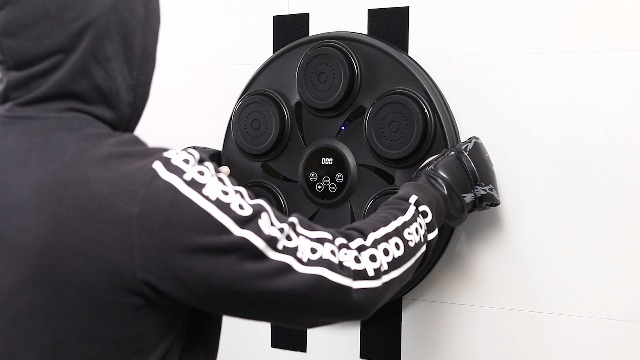
Troubleshooting: Quick Solutions
If you run into problems during or after installation, try these fixes:
- No power: Check the main switch, wall outlet, and circuit breaker.
- Unresponsive sensors: Re-seat all wiring connections. Replace damaged sensor pads.
- No sound: Verify speaker wires and audio settings in the menu.
- Error messages: Consult the manual for error codes. Sometimes a simple reboot fixes software glitches.
If problems persist, contact the manufacturer’s support team or check their official forums for advice.
The Role Of Professional Installation
While many people can install a music boxing machine with basic DIY skills, some situations call for professionals:
- Large multi-unit installations (arcades, gyms)
- Custom integration with lighting, networks, or payment systems
- Local regulations requiring certified electricians
Professional installers provide peace of mind and often include a warranty on their work.
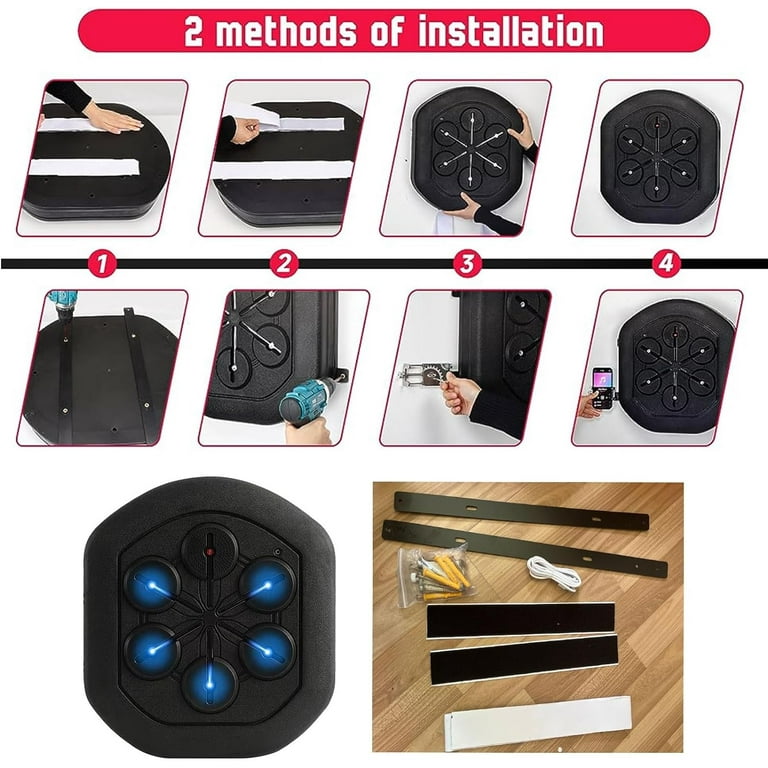
Cost Breakdown Of Installing A Music Boxing Machine
Understanding costs helps with budgeting and decision-making. Here’s a typical cost breakdown:
| Expense | Estimated Cost (USD) | Notes |
|---|---|---|
| Machine purchase | $3,000–$10,000 | Depends on features, brand |
| Shipping & delivery | $200–$800 | Varies by distance/weight |
| Professional installation | $300–$600 | Optional, but recommended for businesses |
| Electrical work | $100–$400 | For dedicated outlet/circuit |
| Accessories (mats, signage) | $50–$200 | Improves user safety/experience |
Keep in mind, ongoing maintenance and software updates may also require a small budget.
Real-world Example: Installing In A Small Gym
Consider a local gym that purchased a Rhythm Boxer X2. They had a 2. 5 x 2. 5 meter space near the cardio area and a dedicated 220V outlet. The gym manager and two staff handled delivery and assembly. They completed the setup in three hours, including anchoring and configuring Wi-Fi.
After the first week, they noticed high use during peak hours. They added floor mats and posted a sign with tips on form and safety. Users reported fewer wrist aches and more enjoyment. The manager updated the music list monthly to keep workouts fresh.
This example shows that careful planning and listening to users can make your installation a success.
Final Thoughts
Installing a music boxing machine is a detailed process, but it’s within reach for most people willing to follow instructions and work carefully. The key steps are preparing your space, assembling and wiring the machine, securing it for safety, and fine-tuning software and settings for your users.
Regular maintenance and occasional updates ensure long-lasting performance and satisfaction.
Don’t rush the process—attention to detail pays off in reliability and enjoyment. If you ever feel unsure, consult your manual or bring in a professional. By following this guide, you’ll create a fun, safe, and exciting environment for everyone who steps up to the machine.
For more technical details and model-specific guides, you can check the official Arcade Game Wikipedia page.
Frequently Asked Questions
What Is The Average Installation Time For A Music Boxing Machine?
Most people can install a standard music boxing machine in 2 to 4 hours. This includes unpacking, assembly, wiring, and testing. If this is your first time, allow extra time for reading the manual and troubleshooting.
Can I Install A Music Boxing Machine By Myself, Or Do I Need Help?
While it’s possible to install smaller models alone, most machines are heavy and bulky. At least two people are recommended for safe lifting and alignment. For commercial installations, professional help is often best.
What Kind Of Maintenance Does A Music Boxing Machine Need?
Regular maintenance includes cleaning punch pads and screens, checking bolts and wiring, and updating software. Frequency depends on usage—public machines need more frequent checks than home units.
Do I Need A Special Electrical Outlet For Installation?
Most music boxing machines use standard 110V or 220V outlets, but a dedicated circuit is best to avoid overloads. Check your machine’s requirements and local electrical codes before installation.
How Do I Update The Music Or Software On My Machine?
Updates vary by model. Many machines allow updates via USB drive, SD card, or Wi-Fi. Check your manual for instructions and always update software to keep features current and secure.