Keeping a music boxing machine in top shape is important for both owners and users. These machines, often found in arcades, entertainment centers, or gyms, mix music with physical activity. People punch pads to the beat, improving their fitness and having fun.
But like any machine, music boxing machines need regular care to work smoothly and stay safe. If you ignore maintenance, you’ll see more breakdowns, poor sound quality, and unhappy players. Let’s dive deep into how you can maintain a music boxing machine the right way, so it stays reliable and enjoyable for years.

Today's Exclusive Deals
Limited-time Exclusive Deals. Check current discount on Amazon.
Check Price on Amazon As an Amazon Associate I earn from qualifying purchases.Understanding The Music Boxing Machine
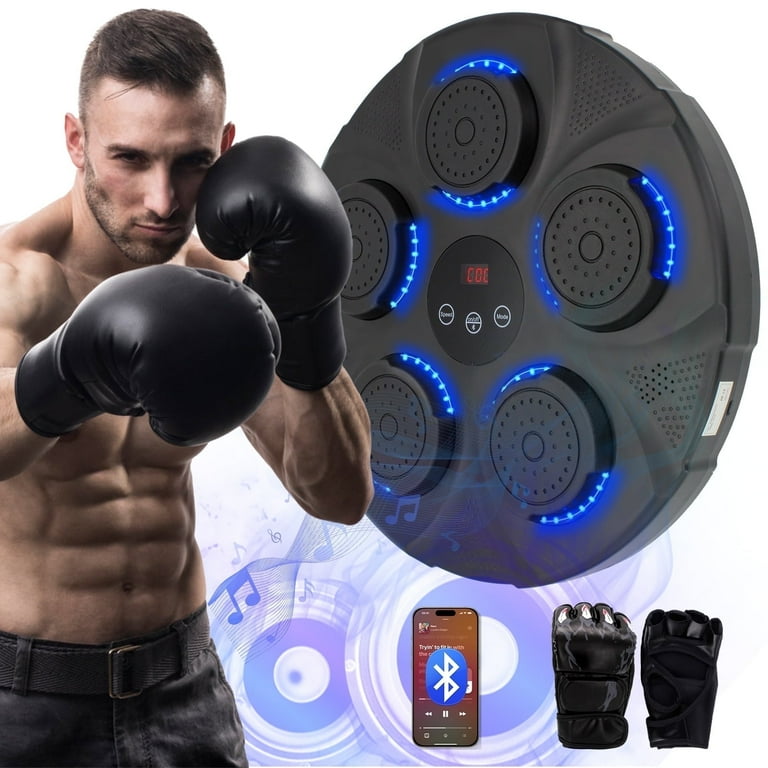
Before you start maintaining, it helps to know what a music boxing machine includes. Most models have a few main parts:
- Punch pads: Where users strike to score points.
- Sensors: Detect punches and send data to the system.
- Sound system: Plays music and feedback sounds.
- Display screen: Shows scores, instructions, and game feedback.
- Main computer: Runs the game logic and connects all parts.
- External casing: Protects the internal hardware.
Some machines also have LED lights, Wi-Fi for online leaderboards, and coin slots for paid play. Each part needs its own care. If one fails, the game experience drops.
Daily Maintenance Checklist
Even simple daily checks can prevent big problems later. Here’s what you should do every day:
- Wipe surfaces: Use a soft, damp cloth to clean punch pads, screens, and casing. Avoid harsh chemicals.
- Check sensors: Tap each pad lightly and watch if the score updates. If a pad seems unresponsive, it might need attention.
- Inspect cables: Look for loose or damaged wires, especially near pads and the mainboard.
- Test sound and display: Play a short game and listen for odd noises, crackling, or dim screens.
- Empty coin boxes: If your machine accepts coins, clear out the box so users can keep playing.
Most owners skip these steps, thinking they’re too simple. But daily care keeps small issues from becoming big repairs.

Weekly Maintenance Tasks
A weekly routine involves deeper checks and cleaning:
- Clean sensors: Dust can block sensors. Use compressed air or a soft brush to remove it.
- Update software: Check for game or firmware updates from the manufacturer. Updated software can fix bugs and add features.
- Examine moving parts: Look at hinges, doors, and pad mounts. Lubricate if needed.
- Check game logs: Many machines record errors. Look for repeated issues that might signal failing parts.
If your machine connects online, also check network performance and security.
Monthly Maintenance Steps
Every month, spend extra time on these tasks:
- Inspect internal hardware: Open the main casing, using proper tools. Look for dust, heat damage, or loose components.
- Test backup battery: Some machines have backup batteries to save scores and settings. Check their charge level.
- Analyze performance data: Review how often the machine is used, which pads get the most hits, and any unusual patterns.
- Replace worn pads: High-use pads wear out faster. Swap them before they fail.
Keeping a monthly log helps you spot problems before they lead to downtime.
Deep Cleaning And Part Replacement
A few times a year, or as needed, you should do a deep clean and replace parts that wear out. Here’s how:
Punch Pads
Pads take the most hits. Over time, their surface can crack or lose sensitivity. Replace them if:
- You see physical damage.
- Players complain about missed punches.
- Pad response drops below 90% accuracy.
Sensors
Sensors can lose calibration or stop working. Test each sensor using the machine’s built-in diagnostic tool. If calibration fails, replace the sensor.
Sound System
Speakers can start to crackle or fade. If you notice poor sound quality, clean speaker grills and check wiring. Replace speakers if sound drops below the manufacturer’s specs.
Display Screen
Screens can develop dead pixels or dim spots. Compare screen brightness to a new machine using a luminance meter. If it falls below 80% of original brightness, consider replacing.
Internal Fans And Cooling
Overheating is a common problem. Dust blocks fans and vents, raising internal temperatures. Clean fans every few months and replace if they become noisy or slow.
Software Maintenance
Music boxing machines run on software that manages games, scores, and user interface. Keeping software updated prevents bugs and security risks.
- Check for updates: Visit the manufacturer’s website monthly.
- Install patches: Follow instructions carefully. Never interrupt an update, as it can corrupt files.
- Back up settings: Before updating, save all settings and scores.
- Test after update: Run a few games to ensure everything works.
Some machines offer automatic updates. But manual checks help you catch missed patches.
Troubleshooting Common Issues
Even with good care, problems can happen. Here are some common issues and how to fix them:
Unresponsive Pads
If a pad isn’t scoring hits:
- Check sensor connections.
- Test with the diagnostic tool.
- Replace the sensor if needed.
No Sound
If the machine is silent:
- Check volume settings.
- Inspect speaker wires.
- Test with another speaker.
- Replace the sound card if nothing works.
Screen Problems
If the display is blank or flickering:
- Restart the machine.
- Check power and signal cables.
- Test with another screen.
Game Crashes
If the game freezes or crashes:
- Check for software updates.
- Scan for viruses if the machine connects online.
- Restart and test again.
Coin Slot Issues
If coins aren’t registering:
- Clean the coin slot.
- Check the sensor.
- Replace if worn out.
Most problems can be solved with these steps. If not, contact the manufacturer or a qualified technician.
Safety Precautions
Safety is essential when working on any machine. Follow these tips:
- Turn off power: Before opening the casing or touching internal parts.
- Use correct tools: Don’t force screws or connectors.
- Wear gloves: To protect hands from sharp parts.
- Avoid liquids: Near electronics.
- Ground yourself: To avoid static shocks.
Regular safety checks prevent injuries and machine damage.
Keeping The Machine Attractive
A clean, well-maintained machine attracts more players. Small touches make a big difference:
- Polish the casing: Use a plastic-safe cleaner.
- Replace faded stickers: Branding and instructions should always look fresh.
- Check lighting: Change any dim or broken LEDs.
- Clean screens: No fingerprints or smudges.
A neglected machine looks unprofessional and can drive customers away.
Data Table: Common Parts And Their Lifespan
Knowing how long parts last helps plan maintenance. Here’s a typical lifespan for key components:
| Part | Average Lifespan | Replacement Cost (USD) |
|---|---|---|
| Punch Pad | 6–12 months | $40–$80 |
| Sensor | 12–24 months | $25–$60 |
| Speaker | 24–36 months | $30–$100 |
| Display Screen | 36–48 months | $100–$400 |
| Cooling Fan | 12–36 months | $15–$50 |
If your machine is in a busy location, parts may wear faster.
Preventing Common Mistakes
Many owners make mistakes that shorten the machine’s life. Watch out for these:
- Using harsh cleaners: They can damage pads and screens.
- Ignoring software updates: Leads to bugs and security risks.
- Skipping logs: You may miss early signs of trouble.
- Neglecting backup batteries: Losing scores and settings is frustrating.
- Overlooking fan cleaning: Overheating causes costly repairs.
If you avoid these mistakes, your machine will last longer and perform better.
Comparing Maintenance Costs: Diy Vs Professional Service
Some owners prefer to fix their machines themselves, while others hire professionals. Here’s a comparison:
| Task | DIY Cost (USD) | Professional Cost (USD) | Skill Needed |
|---|---|---|---|
| Pad Replacement | $40–$80 | $80–$120 | Basic |
| Sensor Calibration | $0 | $50–$100 | Intermediate |
| Speaker Repair | $30–$100 | $100–$200 | Intermediate |
| Screen Replacement | $100–$400 | $200–$600 | Advanced |
| Software Update | $0 | $50–$150 | Basic |
DIY is cheaper but needs some skill. Professional help is safer for complex repairs.
Keeping Records And Planning Ahead
Good maintenance means keeping detailed records:
- Log each repair: Date, part, cost, and issue.
- Track part usage: Which pads or sensors wear fastest.
- Plan replacements: Order parts before they fail.
Some owners use spreadsheets or apps. This helps you budget and avoid surprises.
Upgrading Your Music Boxing Machine
As technology changes, upgrading can boost performance and attract new users. Here are smart upgrades:
- Better sensors: Improve accuracy and speed.
- Louder speakers: Make music clearer and more exciting.
- Touch screen displays: Easier navigation and feedback.
- Wi-Fi connectivity: For online scores and updates.
- New game modes: Fresh challenges for regular players.
Upgrade only if your machine supports it. Check the manufacturer’s advice.

Example: Real-world Maintenance Routine
Let’s look at a real example from a busy arcade. The owner follows this schedule:
- Daily: Wipe surfaces, test pads, check sound.
- Weekly: Clean sensors, check logs, update software.
- Monthly: Open casing, clean fans, test battery, replace worn pads.
- Quarterly: Deep clean, replace sensors, upgrade parts if needed.
This routine keeps the machine running with minimal downtime. Players notice the difference—a clean, reliable machine attracts more customers.
Data Table: Usage Vs Maintenance Frequency
How often should you maintain? It depends on usage. Here’s a guide:
| Average Daily Plays | Daily Tasks | Weekly Tasks | Monthly Tasks |
|---|---|---|---|
| Less than 50 | Quick wipe | Basic check | Simple clean |
| 50–200 | Full wipe & test | Detailed check | Deep clean |
| 200+ | Full wipe & test | Detailed check & part swap | Full internal clean |
Busy machines need more frequent care to avoid breakdowns.
Sourcing Parts And Manufacturer Support
Always use official parts for replacements. Cheap parts can fail quickly or cause damage. Check the manufacturer’s website or authorized dealers for sensors, pads, and screens. If you need help, ask for technical support. Many companies offer online guides, videos, or live chat.
For more tips on arcade machine maintenance, visit Wikipedia.
Non-obvious Insights Beginners Miss
Most beginners focus only on the visible parts, like pads and screens. But deeper care matters:
- Software logs: These often show hidden problems before a breakdown.
- Fan and cooling system: Ignoring these can silently ruin the mainboard.
- Backup batteries: Losing scores or settings is common if batteries aren’t checked.
If you pay attention to these areas, your machine will run longer and more reliably.
Frequently Asked Questions
What Is The Best Way To Clean Punch Pads?
Use a soft, damp cloth with mild soap. Avoid alcohol or harsh cleaners, as they can damage the surface. Dry the pads fully before use to prevent slipping.
How Often Should I Update The Software?
Check for updates once a month. Updates fix bugs and improve security. Always back up your settings before updating.
Can I Use Third-party Parts For Replacements?
It’s safer to use official parts from the manufacturer. Third-party parts may not fit well or work reliably, which can cause bigger problems.
What Should I Do If The Machine Overheats?
First, clean the fans and vents. If the machine still gets hot, check for faulty fans or blocked airways. Consider moving the machine to a cooler spot and contact support if problems continue.
Is Professional Maintenance Worth The Cost?
For simple tasks, DIY is fine. But for complex repairs (like screen replacement or mainboard fixes), professional help is safer and often prevents future problems.
Taking care of your music boxing machine is not just about fixing problems—it’s about preventing them. With regular maintenance, careful cleaning, and smart upgrades, your machine will stay fun, reliable, and safe for everyone. Whether you own one for business or personal use, a well-maintained machine is always a good investment.